Business Operations
How to Hire a Medical Virtual Assistant: HIPAA, Billing, and Scheduling for US Practices
Hire HIPAA-safe medical virtual assistants: define role scope, secure access, test billing/scheduling skills, and track KPIs.
13 min read
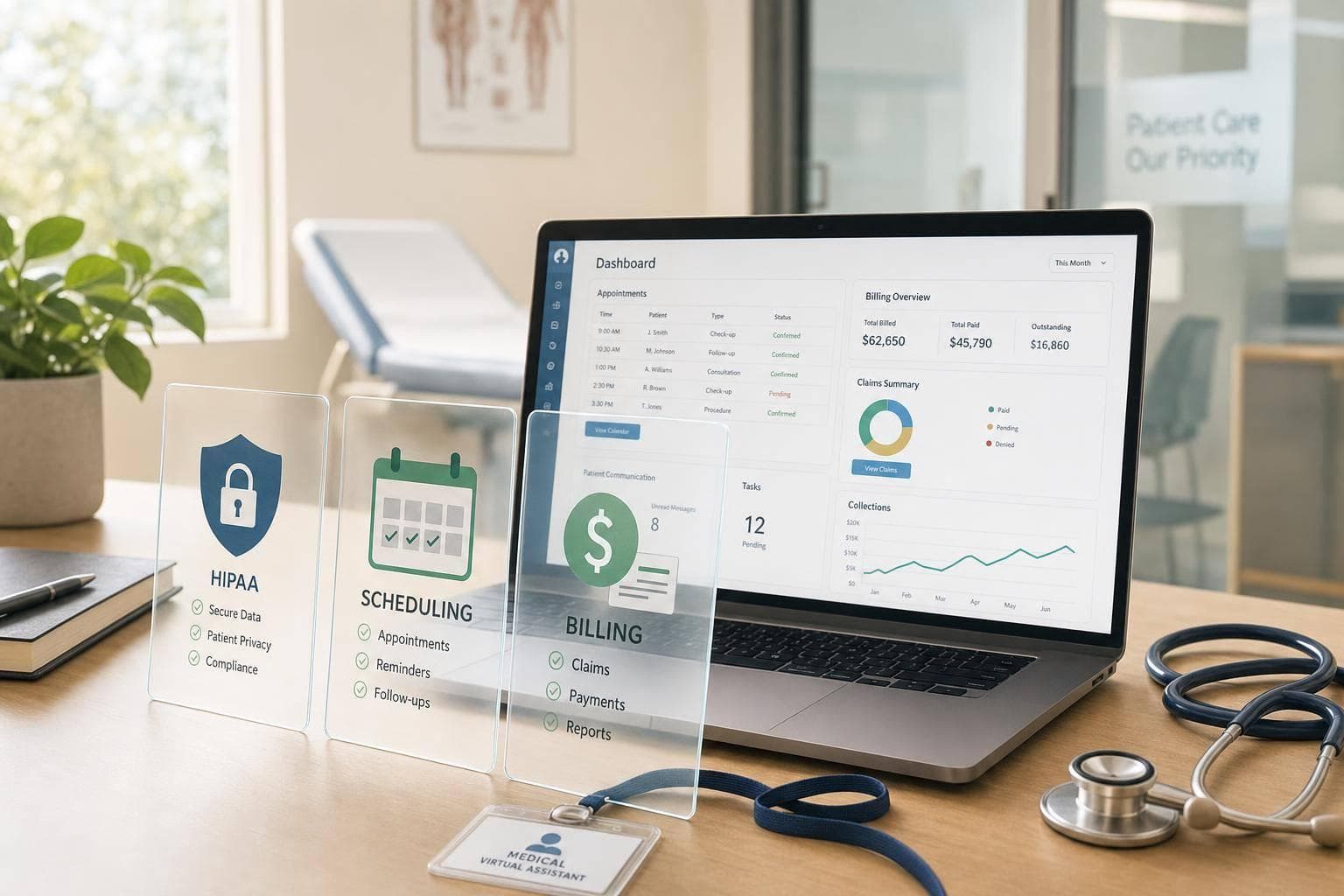
If I were hiring a medical virtual assistant for a U.S. practice, I’d focus on four things first: role scope, HIPAA limits, billing/scheduling skills, and locked-down system access.
That’s the core issue. A medical virtual assistant can take work off the front desk, help with eligibility checks, reminders, claims follow-up, and payment posting, and often costs about $1,200–$1,800 per month or around $6–$13 per hour. But the role only works if I keep PHI access tight, train the person on my workflows, and review performance with clear KPIs like fill rate, clean claims rate, and days in A/R.
Here’s the short version:
- I’d delegate repeatable admin work, not clinical judgment
- I’d limit access based on the minimum necessary rule
- I’d test candidates with HIPAA and billing/scheduling scenarios
- I’d require separate logins, MFA, VPN, encryption, and audit logs
- I’d track results with weekly scorecards and 90-day reviews
A few numbers stand out:
- Filipino virtual assistants specializing in healthcare support is a common choice for U.S. practices
- The Philippines’ BPO sector employs about 1.9 million workers
- A common clean claims target is 90%+
- A common A/R target is under 40–45 days
- Reminder workflows can cut no-shows by 20%–30%
- HIPAA training records should be kept for 6 years
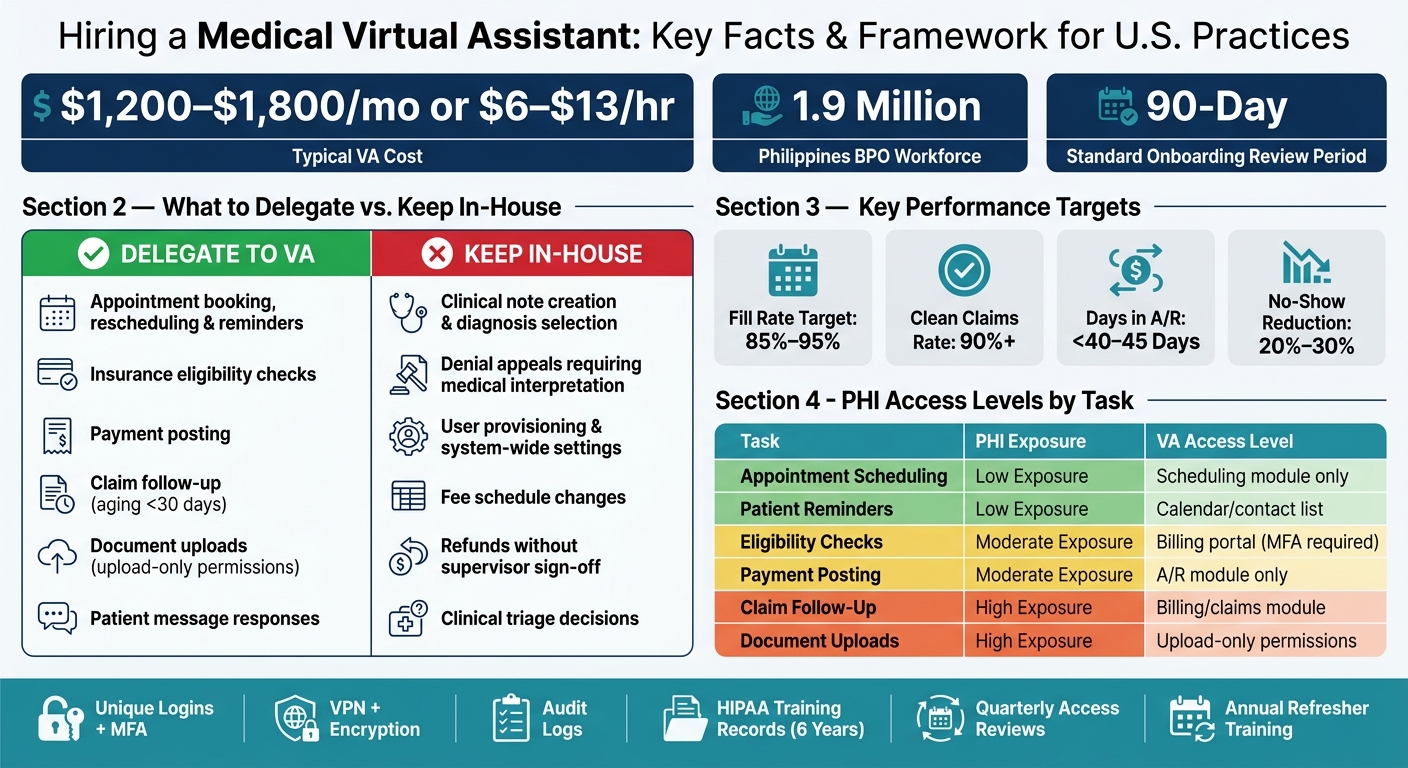
Medical Virtual Assistant: What to Delegate vs. Keep In-House
HIPAA Basics for Medical Virtual Assistants
sbb-itb-3690fed
Quick comparison
| Area | What I’d hand off | What I’d keep in-house | What I’d check |
|---|---|---|---|
| Scheduling | Booking, rescheduling, reminders | Clinical triage, approval-only visit types | Fill rate, no-show rate |
| Billing support | Eligibility, payment posting, claim follow-up | Coding decisions, fee changes, refunds without sign-off | Clean claims, A/R days, denial turnaround |
| HIPAA access | Task-based, limited system access | User provisioning, broad admin rights | Audit logs, access reviews |
| Onboarding | SOP review, role-based training, workflow practice | Final access approval, policy updates | 90-day review, quarterly log checks |
Put simply: I’d hire for a narrow job first, verify HIPAA judgment before access starts, and expand duties only after the person shows clean work and safe system use.
Step 1: Define a HIPAA-Safe Role for Billing and Scheduling
A loose role definition can give someone more access than they need. That’s a HIPAA problem. In a remote setup, clear role limits are one of your main protections against unnecessary PHI exposure.
Map Tasks by PHI Exposure and Access Level
HIPAA’s minimum necessary rule means a remote assistant should only see and do what the job calls for. A scheduler doesn’t need clinical notes. A billing assistant doesn’t need full chart access. The smart move is to sort each task by PHI exposure, then match it to the smallest level of access that still lets the person do the work.
| Task | PHI Exposure | Recommended Access | Key Safeguards |
|---|---|---|---|
| Appointment scheduling | Low (name, contact, appointment details) | Scheduling module only | Audit logs, no clinical chart access |
| Patient reminders | Low (name, appointment type) | Calendar/contact list | HIPAA-compliant messaging tool |
| Insurance eligibility checks | Moderate (DOB, policy ID) | Eligibility/billing portal | MFA, encrypted connection |
| Payment posting | Moderate (name, balance) | Accounts receivable module | Role-based access, audit logs |
| Claim follow-up | High (codes, payer data) | Billing/claims module | Role-based access, quarterly audits |
| Document uploads | High (chart-level data) | Upload-only permissions | Encrypted device, no local file storage |
For scheduling, the assistant usually needs only the patient’s name, date and time, provider, and reason for visit.
After you map access, set a firm boundary between delegated admin work and the tasks that should stay with your internal team.
Decide What Stays In-House and What Can Be Delegated
A simple four-question test can help:
- Does the task require full chart access?
- Does it require clinical judgment?
- Does it involve broad system permissions?
- Does it follow a standardized, step-by-step process?
If the first three answers are “yes,” or the fourth is “no,” keep that task in-house.
In plain English: hand off repeatable, rules-based work. Keep clinical judgment, user provisioning, and system-wide changes with your internal staff.
Tasks that should stay in-house include clinical note creation, diagnosis selection, denial appeals that call for medical interpretation, user provisioning, and any changes to fee schedules or system-wide settings. Poorly scoped access has already led to HIPAA violations.
Write a Role Description Tied to Daily Workflows
A strong job description should spell out the exact systems the assistant will use, the daily workload, and the time-zone expectations.
Specific task examples make screening much easier. Phrases like "verify eligibility for 20–30 patients per day," "reschedule canceled visits within 15 minutes of notice," or "follow up on aging claims under 30 days via payer portals" show candidates what the work looks like day to day. They also give you a clear way to compare applicants using the same yardstick.
Include the daily volume, shift hours, payer mix, and the exact systems involved. Say up front whether the role is scheduling-only, billing-support only, or a blended admin position. Scope creep after onboarding is much harder to fix than a clear role from day one. Use that scope to screen candidates in the next step.
Step 2: Vet Candidates for HIPAA Awareness, Billing Support, and Scheduling Accuracy
Once the role is clear, the next job is simple: make sure the candidate can do the work safely, accurately, and in a way that fits U.S. healthcare workflows.
You’re not just checking for admin experience here. You’re checking for HIPAA judgment, billing support skills, scheduling accuracy, and clear patient communication. A person can be organized and still struggle with payer portals, EHR workflows, or billing follow-up under compliance rules.
Check the Qualifications That Matter for US Clinics
A good starting point is 1–3 years of U.S. healthcare administration experience. That matters because general admin work usually doesn’t cover healthcare-specific tasks like payer portal use, EHR navigation, or claim follow-up under compliance limits.
Use the table below to separate hands-on healthcare support from broad admin work. Then use those points to shape your interview and skills test.
| Qualification | Why It Matters | Likely Responsibilities |
|---|---|---|
| ICD-10 / CPT / HCPCS familiarity | Cuts down charge entry and claim review mistakes | Billing support, claims submission, claim follow-up, denial triage |
| Insurance verification experience | Shows they can use payer portals and record results the right way | Eligibility checks, prior authorization tracking, documenting benefits |
| EHR / practice management system experience (e.g., Athenahealth, Kareo, DrChrono, Epic) | Means less retraining and fewer workflow mistakes from day one | Scheduling, demographics updates, encounter creation |
| Medical terminology familiarity | Helps with accurate documentation and provider communication | EHR data entry, billing notes, patient intake |
| Strong written and spoken English | Non-negotiable for patient-facing communication | Reminder calls, portal messages, billing inquiries |
For patient-facing work, test accent clarity, pace, and accuracy. A 5-minute live phone screen works better than a written test for this. Role-play a routine appointment confirmation or a billing question and listen for how the candidate handles the call.
Use Interview Questions and Skills Tests Based on Real Scenarios
Generic questions like "Are you familiar with HIPAA?" don’t tell you much. A real scenario does.
For HIPAA readiness, use interview prompts like these:
- A patient's family member calls asking for their test results. What do you do?
- You receive an email from a payer that includes another patient's EOB by mistake. Explain your next step.
- A colleague asks to use your login while their access is being reset. How do you handle that?
Strong candidates know when to escalate PHI issues, protect system access, and say no to shortcuts like personal email or shared logins.
For scheduling and billing, practical exercises tend to show more than talk. Use a mock scheduling task to see how the candidate fixes double-bookings and handles same-day openings. Use a denied-claim scenario to see how they review the issue and work toward a fix.
That’s the difference between someone who knows the terms and someone who understands how U.S. healthcare workflows actually work.
Use FindTalent.ph to Narrow the Shortlist
FindTalent.ph helps narrow the shortlist by matching your role’s PHI exposure, EHR, billing, and scheduling needs with Filipino candidates who already have healthcare support experience.
If you want more help upfront, the recruiter-assisted option handles preliminary interviews, checks HIPAA training, and confirms English proficiency before sending your shortlist.
Healthcare virtual assistants are currently listed at $6–$13 per hour for full-time, part-time, or gig roles.
After shortlist vetting, move to secure access, training, and workflow onboarding.
Step 3: Set Up Compliant Tools, Access, and Onboarding
Before live access starts, lock down your systems, paperwork, and day-to-day process.
Configure Secure Access to EHR, Scheduling, and Billing Systems
Once you've picked the assistant, decide which systems they can use and the exact permissions they need. Give them a unique account for each system they use. HIPAA's Security Rule requires unique user identification so activity can be tied to one person. Shared logins shouldn't be used. Add multifactor authentication (MFA) to the EHR, billing platform, scheduling system, and secure messaging tools.
Only give access that's tied to the assistant's assigned tasks. Then document each permission in a written access matrix before day one.
| System Category | Main Use | Access Concerns | Remote-Assistant Suitability |
|---|---|---|---|
| EHR/EMR | Clinical notes, charting, demographics | Highest PHI sensitivity; strict least-privilege required | Use only for scheduling or demographics, never full-chart access. |
| Scheduling platform | Appointment booking, reminders, rescheduling | Appointment details and contact data still count as PHI. | Highly suitable with role-based permissions and audit logging |
| Billing/RCM system | Claims, eligibility, denial work, payment posting | Insurance, payment, and claim data can overlap with clinical information. | Suitable for billing-focused assistants with task-specific permissions |
| Secure messaging/portal | Patient communication, internal coordination | Messages may contain PHI; retention controls matter | Suitable if encrypted, logged, and limited to approved users |
Set a hard baseline for the assistant's work setup:
- A dedicated encrypted workstation
- Private internet
- VPN access
- No local storage
- No screenshots
- Audit logs across every system
These controls should be in place on every system the assistant touches.
Once access is narrowed down, get the legal and training pieces in place before the assistant logs in.
Complete the Compliance Paperwork and Training
Before access begins, put the needed BAA or contractor agreement in place and update your HIPAA policies for remote work.
HIPAA training should match the assistant's role and level of access. That training needs to cover the Privacy and Security Rules as they apply to scheduling and billing work, your clinic's rules for remote PHI handling, incident identification and reporting steps, and the right way to use each system while staying compliant. Keep signed acknowledgments, attendance records, and short scenario-based assessments before giving live system access.
With access approved, the next move is to write down exactly how the assistant will use each system.
Document Standard Workflows for Scheduling and Billing
Create SOPs for every task the assistant owns. For scheduling, cover new patient scheduling, follow-up appointments, cancellations and no-shows, reminder calls, and same-day and urgent scheduling rules. Each SOP should spell out which appointment types the assistant can book on their own and which ones need clinician approval.
For billing workflows, document the full scope: eligibility and benefits verification, prior authorization tracking, charge entry support, payment posting, and denial identification. Just as important, make it clear what the assistant does not do. That includes independent coding decisions, fee schedule changes, or issuing refunds without supervisor sign-off.
These SOPs give you a baseline for checking accuracy, turnaround time, and compliance in the next step.
Step 4: Manage Performance, Compliance, and Growth
Once onboarding is done, the job shifts from setup to steady management. That means tracking KPIs and running audits on a set schedule.
Track Scheduling, Billing, and Quality Metrics
Track three KPI groups: scheduling, billing, and quality. Focus on the work that has the biggest day-to-day impact: scheduling throughput, billing speed, and documentation accuracy. These numbers show whether scheduling, billing, and patient messages are moving on time.
For scheduling, watch:
- Appointment fill rate: booked slots ÷ available slots
- No-show rate
- Reminder completion rate: the share of scheduled patients who received at least one successful reminder
In outpatient primary care, fill rates are often targeted at 85%–95%, and steady reminder workflows can cut no-shows by 20%–30%.
For billing, focus on clean claims rate with a target above 90% on first submission, days in A/R with a target under 40–45 days, and denial turnaround time, measured from the date a denial is posted to the date a corrected claim is resubmitted.
Also track documentation error rate, with a target under 2% in critical fields like insurance ID and subscriber details, plus response time during business hours for patient messages and billing inquiries, which is usually within 1–2 business days.
Use a one-page scorecard. Update it daily. Review it weekly. Simple beats messy here.
Review Access, Audit Logs, and Refresher Training on a Set Schedule
Handle compliance on a fixed calendar, not by gut feel. HIPAA's Security Rule requires covered entities to regularly review records of information system activity, including audit logs and access reports, to detect security incidents.
In plain English, that means looking for odd patterns on a routine basis, such as access to records outside normal workflows, high-volume queries, or attempted data exports. Use the assistant's approved access list as the baseline for each review.
Use this review schedule:
| Milestone | Activities | Responsible Owner | Cadence |
|---|---|---|---|
| Onboarding | System access setup, HIPAA training, SOP review | Practice Manager | Week 1–2 |
| Early performance check | Supervised execution, daily check-ins, weekly KPI review | Practice Manager | Weeks 3–8 |
| 90-day review | Formal performance review, access/audit log check, scope discussion | Practice Manager + Compliance Officer | Day 90 |
| Ongoing compliance | Audit log sampling, access recertification, HIPAA micro-training | Compliance Officer + IT Admin | Quarterly |
| Annual refresher | Full HIPAA and security training, role reassessment, documentation quiz | Compliance Officer | Annually |
HIPAA training records, including date, topics covered, trainer, and test scores, should be kept for six years to support audit readiness. Annual refresher training is the minimum. Add quarterly 15–30 minute micro-sessions when policies or systems change.
If KPIs stay on target and audit logs stay clean, expand the role one task at a time with a new SOP and updated permissions.
Conclusion: Hire for Scope, Verify for Compliance, and Onboard for Consistency
The four steps in this guide follow a clear sequence: define the role around minimum-necessary PHI access, screen candidates for hands-on healthcare admin and billing experience, check HIPAA awareness with scenario-based tests, lock down the tech stack before day one, and then manage the role with SOPs and measurable KPIs. Skip one part, and the gap usually shows up later as billing errors, scheduling problems, or compliance risk.
FindTalent.ph can help U.S. medical practices narrow the shortlist to Filipino remote talent with healthcare admin and compliance experience, including assistants who can work U.S. office hours. If your practice is ready to hire, start with a clearly scoped role description, a short HIPAA scenario test in the interview, and a 90-day onboarding plan built around the KPIs and compliance checkpoints outlined here.
FAQs
Do I need a BAA for a medical virtual assistant?
Yes. If a medical virtual assistant handles HIPAA-sensitive admin work or can access protected health information (PHI), you need a Business Associate Agreement (BAA).
That contract helps make sure they follow HIPAA privacy and security rules when dealing with patient data, billing details, or scheduling records. It’s also smart to use role-based access, so they can only view the PHI needed to do their job.
What EHR and billing access should a virtual assistant have?
A medical virtual assistant should have only the EHR and billing access needed for the job at hand. That means using role-based access controls and giving permission only for tasks like claims processing, insurance verification, or appointment scheduling, not broad admin access.
Access to sensitive patient and financial data should stay tight. Give them only what they need to do their work, nothing more. It also helps to review access levels every quarter and make sure the assistant has hands-on experience with your specific platform.
How long should I test a medical virtual assistant before expanding the role?
Test your medical virtual assistant for 30 days before you expand their role.
Set clear weekly deliverables during that trial period. That way, you can see how they handle day-to-day work, communication, and follow-through without making a bigger commitment too soon.
If the fit isn’t right, part ways on day 30 and move to another shortlisted candidate. Many practices also keep a second VA on standby, which gives them a backup plan if the first hire doesn’t work out.