Business Operations
How to Scale Your Business with Remote Workers
Cut hiring costs and scale with remote workers by tapping global talent (notably the Philippines), AI hiring, and results-focused management.
11 min read

Scaling your business doesn't have to mean skyrocketing costs or struggling to find local talent. Remote workers offer a cost-effective, efficient way to grow your team without compromising on quality. By hiring globally, especially from talent-rich countries like the Philippines, you can access skilled professionals at significantly lower costs.
Key Takeaways:
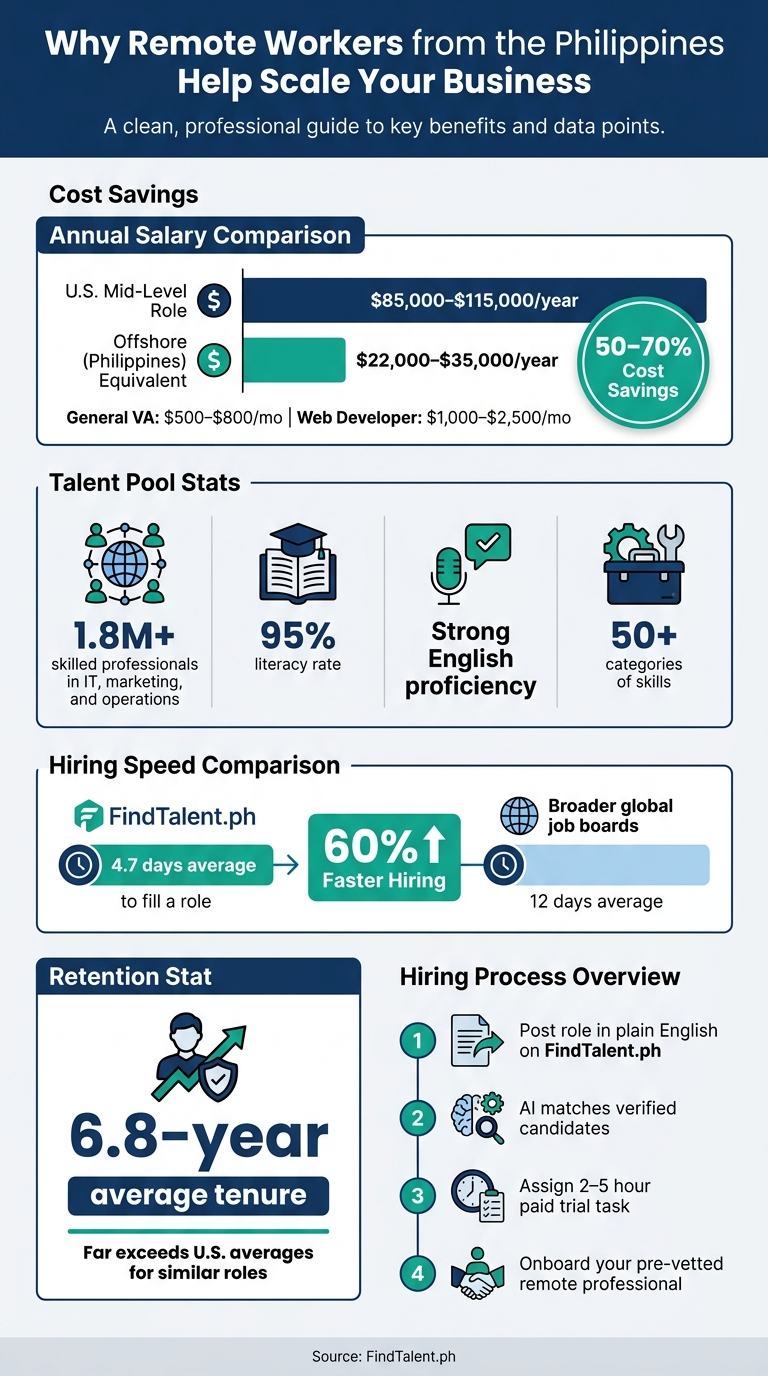
- Cost Savings: Offshore roles can cost 50–70% less than U.S.-based positions. For example, a U.S. mid-level role costing $85,000–$115,000 annually can be filled for $22,000–$35,000 offshore.
- Talent Pool: The Philippines stands out with 1.8M+ professionals skilled in IT, marketing, and operations, a 95% literacy rate, and strong English proficiency.
- Efficient Hiring: Platforms like FindTalent.ph use AI to match candidates quickly, filling roles in 4.7 days on average.
- Retention: Filipino remote workers average a 6.8-year tenure, far exceeding U.S. averages for similar roles.
Why It Works:
Remote workers bring flexibility and expertise, enabling businesses to scale operations while maintaining efficiency. The key is to focus on clear hiring processes, effective communication tools, and a results-oriented approach. In the sections below, learn how to recruit, manage, and empower remote teams to drive growth.
Hiring Remote Workers from the Philippines vs. U.S.-Based Employees: Cost & Benefits
How To Scale a Remote Business with Liam Martin @ Time Doctor - Escape Velocity Show #45
sbb-itb-3690fed
How to Find and Hire the Best Remote Talent
Hiring skilled remote workers requires a focused approach to sourcing and a thorough screening process. With a vast pool of talented professionals in the Philippines available for remote roles, the real challenge lies in quickly identifying the best fit. These platforms simplify the process, helping you connect with the right candidates efficiently.
Using AI-Powered Talent Matching
FindTalent.ph makes sourcing seamless by allowing you to outline your requirements in plain English. The platform then matches you with verified specialists, ensuring every profile is reviewed for accuracy. On average, job postings targeting Filipino talent are filled in 4.7 days, compared to 12 days on broader global job boards. That’s a 60% faster turnaround, which can be crucial when scaling your team.
If you'd rather not handle the screening process yourself, the platform also offers a recruiter-assisted plan for a more hands-off experience.
Recruiter-Assisted Plans for Pre-Vetted Candidates
For those who prefer to skip the screening process, FindTalent.ph’s recruiter-assisted plan takes care of everything. Their expert recruiters handle sourcing, interviews, skills testing, and candidate verification. You’ll receive 1–3 pre-vetted professionals who have already passed identity checks, portfolio reviews, and skills assessments, delivered straight to your inbox. Plus, the service includes a free replacement guarantee if the hire doesn’t work out.
Here’s a quick look at salary benchmarks: general virtual assistants typically earn between $500–$800 per month, while web developers range from $1,000–$2,500 per month. This approach not only saves time but also keeps costs manageable.
"Hiring through FindTalent.ph has been a game-changer for our operations. We've been able to keep costs low while working with a highly skilled specialist who handles key operational tasks." - Sarah Adamsen, Operations Manager, Whitmore Strategy Group
Before making a final decision, it’s a good idea to assign a 2–5 hour paid trial task. This helps evaluate a candidate’s work quality, communication skills, and attention to detail.
How to Build a Productive Remote Team
Bringing skilled remote professionals together into a cohesive team is essential for driving efficient growth. Once you've secured top talent, the next step is to create a team dynamic built on structure, trust, and clear expectations.
Building a Strong Remote Work Culture
Developing a strong remote culture takes intentional effort. Simple rituals like a quick Monday kickoff meeting, a Slack thread for sharing kudos, or a rotating "Question of the Day" can go a long way in fostering team connection.
Take GitLab, for example. With over 2,100 employees spread across 65+ countries and no central office, they rely on a publicly accessible employee handbook to serve as their single source of truth. This level of transparency ensures everyone stays aligned, no matter where they are.
"A culture's effectiveness revolves around how information flows. Everyone needs to feel like they have access to the same information." - Nick Francis, CEO, Help Scout
When onboarding new team members, consider assigning them two buddies: a "culture buddy" to help them feel at home and a "systems buddy" to guide them through tools and workflows. These small steps can help new hires integrate quickly and effectively.
By building a strong culture, you lay the groundwork for smooth and efficient communication - something we'll dive into next.
Setting Up Clear Communication Channels
One common pitfall for remote teams is relying on a single tool for all communication needs. Instead, use a mix of platforms tailored to different purposes. For example:
- Slack or Microsoft Teams for quick conversations
- Zoom or Google Meet for detailed discussions
- Asana or Trello for task and project management
Set clear expectations for how and when to communicate. For instance, you might establish a two-business-hour response time for Slack messages to avoid the need for constant check-ins. It's also critical to outline scenarios that require immediate attention, such as a major client issue or a broken system.
To keep everyone aligned, introduce a daily summary that highlights achievements, ongoing tasks, and any blockers. This simple practice can ensure the entire team stays in sync.
Focus on Results, Not Hours Worked
In a remote setup, tracking hours isn't the best way to measure productivity. Instead, focus on outcomes. Shift to an output-based model where success is defined by clear deliverables. Before starting any task, outline exactly what "done" looks like, including objectives, success criteria, deadlines, resources, and contact points for support.
This approach not only eliminates the need for micromanagement but also attracts high-performing professionals who prefer being evaluated on their results instead of their screen time.
"When you have a distributed company, you have to try to hire folks predisposed to finding problems and solving them." - Wade Foster, CEO, Zapier
Zapier has operated with this mindset since its inception in 2011. With over 800 employees across six continents and no central office, they’ve proven that a results-driven model works.
Tools That Help Remote Teams Work Better Together
The right tools can make all the difference between a remote team that struggles and one that operates like a well-oiled machine. You don’t need a massive tech stack - just tools that fit your team’s specific needs.
Collaboration and Productivity Tools Worth Using
It’s tempting to rely on one tool for everything, but it’s far better to assign each tool a specific role. For instance:
- Slack or Microsoft Teams are perfect for organizing project discussions and facilitating communication across time zones.
- For real-time interactions, Zoom or Google Meet are ideal for onboarding, team check-ins, or brainstorming sessions.
- Tools like Asana, Trello, ClickUp, or Jira offer clear task tracking and help teams stay on top of progress, deadlines, and blockers - without the need for constant meetings.
Documentation is another cornerstone of remote teamwork. Platforms like Notion or Google Drive act as a searchable library for storing SOPs, brand guidelines, or decision logs. This ensures that team members can easily find information, even months later. And when written instructions fall short, Loom allows you to create quick, step-by-step screen recordings to explain recurring tasks visually.
| Tool Category | Recommended Platforms | Primary Use Case |
|---|---|---|
| Communication | Slack, Microsoft Teams | Real-time chat and organized discussions |
| Project Management | Asana, Trello, ClickUp, Jira | Task tracking and async collaboration |
| Video/Meetings | Zoom, Google Meet, Loom | Face-to-face calls and video tutorials |
| Documentation | Notion, Google Drive | SOPs, handbooks, and knowledge storage |
To avoid confusion, assign one platform as the go-to for task assignments. Miscommunication, like assuming someone else is handling a task, is a common pain point for remote teams - accounting for 21% of remote work challenges. A unified system can reduce these issues significantly.
Once you’ve nailed collaboration, it’s time to tackle repetitive tasks. Many businesses hire Filipino virtual assistants to manage these workflows efficiently.
Automating Repetitive Tasks
Automation isn’t about replacing people - it’s about freeing them up to focus on work that matters. By automating routine tasks like scheduling, reporting, and data entry, your team can save time and energy.
- Reclaim helps manage calendars automatically, blocking time for focused work.
- Fathom transcribes and summarizes meetings, so no one has to worry about taking notes.
- For customer support, Gorgias Automate handles repetitive inquiries, streamlining ticket resolution.
When it comes to research and content creation, tools like ChatGPT and Perplexity are becoming go-to solutions for operations virtual assistants managing writing or data tasks. On the design side, Canva Magic Studio simplifies creative work, allowing teams to handle design tasks without needing a specialist. These tools let your team focus on what truly requires their skills and creativity.
How to Track and Improve Remote Team Performance
Once workflows are established, it's essential to evaluate how your remote team is performing and address any challenges quickly.
Setting and Tracking Key Performance Metrics
Tracking performance isn't about monitoring hours worked or the number of messages sent - it's about focusing on measurable results. Start by defining clear, role-specific KPIs (Key Performance Indicators). For instance:
- A customer support representative can be evaluated based on metrics like first response time, resolution rate, and customer satisfaction scores.
- A content writer might be measured by the number of articles published, engagement rates, or improvements in keyword rankings.
- A developer's performance could be assessed by weekly code commits and the ratio of bugs resolved to bugs reported.
Using the "Done looks like" approach can help clarify expectations. This method defines deliverables, success criteria, and deadlines for each task, ensuring everyone understands what success entails.
Here’s a breakdown of key metrics and tools you can use:
| Metric Category | Example KPIs | Recommended Tools |
|---|---|---|
| Output | Tasks completed, sales closed, code commits | Trello, Asana, Jira |
| Quality | Error rates, CSAT scores, resolution rate | Zendesk, HubSpot |
| Time Management | Deadline adherence, time to complete tasks | Time Doctor, Hubstaff |
| Collaboration | Slack engagement, document edits | Slack, Notion |
| Growth | OKR achievement, skill acquisition | 15Five, Lattice |
By consistently tracking these KPIs, you can ensure your business is scaling effectively. Once metrics are in place, the next step is delivering feedback that drives meaningful improvement.
Giving Feedback That Drives Improvement
Tracking metrics is only part of the equation; actionable feedback is equally essential for improving performance. Unfortunately, feedback is often mishandled. As WorkFil notes:
"Praise is often undersupplied; constructive feedback is often oversoftened".
To address this, establish a structured feedback routine. Consider the following rhythm:
- Daily asynchronous updates: Use Slack to share what’s been completed, what’s next, and any blockers.
- Weekly one-on-one video calls: Dedicate 30 minutes to coaching, discussing progress, and personal check-ins.
- Monthly performance reviews: Tie these reviews directly to the KPIs you’ve defined.
When addressing underperformance, focus on critiquing the work, not the person. For example, instead of saying, "You were unclear in that client email", try, "This email was too vague; the client wasn’t sure of the next steps." Framing feedback objectively encourages open dialogue about challenges without assigning personal blame.
In teams where employees might hesitate to speak up - especially in cultures with high deference to authority - create opportunities for open communication. Ask questions like, "Is there anything in my approach that’s slowing you down?" Building trust early ensures that your feedback practices lead to lasting improvements and stronger team performance.
Conclusion: Grow Your Business with Remote Workers
Remote workers offer a smart and cost-efficient way to scale your business. By combining a solid hiring process, clear communication methods, and a focus on results, remote teams can often outperform traditional in-office setups - both in terms of productivity and cost.
The Philippines has emerged as a standout option for remote talent. With more than 1.8 million professionals skilled in areas like IT, finance, marketing, and operations, the country provides access to a deep talent pool. Even better, companies can save 50% to 70% compared to hiring for similar roles in the U.S.. Platforms like FindTalent.ph simplify the hiring process by using AI to match candidates across 50+ skill categories, with pre-vetted pipelines to speed things up.
But here’s the thing: hiring remote talent isn’t just about cost or convenience. As Nicolas Bivero, CEO and Co-Founder of Penbrothers, puts it:
"It's an extension of your team. You're not hiring someone just for a few months, you're hiring someone who will be part of your next phase of growth."
This perspective is crucial. Success with remote teams requires treating them as integral parts of your business - focusing on long-term collaboration rather than short-term fixes. To get there, you’ll need to set clear expectations, establish strong communication systems, and track results with measurable metrics.
With the right approach, the combination of skilled talent and proven systems can help your business scale efficiently and effectively.
FAQs
Which roles should I hire remotely first?
When building a remote team, it's smart to begin with roles that are both essential for scaling and well-suited to a virtual setup. Key positions to consider include Customer Support Agents (CSAs), Sales Development Representatives (SDRs), virtual assistants, and administrative support staff. These roles are budget-friendly, rely heavily on strong English communication skills, and can be handled independently without constant supervision. By focusing on these positions first, you create a dependable backbone for your remote team, keeping costs manageable while positioning your business for growth.
How do I protect data when working with remote staff?
To keep data secure when collaborating with remote staff, it's crucial to adopt robust cybersecurity practices. Start by encrypting sensitive data and restricting access to only those who need it. A secure VPN is essential for protecting communications over the internet.
Regularly updating devices and software is another key step, as it helps close potential security gaps. Encourage the use of strong, unique passwords and educate your team to recognize and avoid phishing scams.
Don’t overlook physical security - ensure devices are kept safe and discourage using public Wi-Fi. Instead, rely on secure, private connections. These measures not only protect your data but also help you stay aligned with privacy regulations.
How do I handle time zone differences with a remote team?
When working with remote teams, such as professionals in the Philippines (UTC+8), time zone differences can be a challenge. Tools like Google Calendar make it easier to identify overlapping hours for collaboration. For example, if your team operates on Eastern Standard Time (EST), a common overlap window might be 3 PM to 12 AM Philippine time, allowing for real-time communication during shared working hours.
For tasks that don’t require immediate responses, embracing asynchronous workflows ensures productivity without disrupting local schedules. This approach allows team members to work at their own pace while meeting deadlines. Setting clear expectations and planning with flexibility helps maintain efficiency and respect everyone’s time.