Business Operations
101 Tasks You Can Delegate to a Virtual Assistant (Sorted by Role and Hourly Value)
101 tasks you can delegate to VAs across admin, support, marketing, sales, bookkeeping, and EA, with U.S. hourly value ranges.
18 min read

If you’re still doing inbox work, scheduling, follow-ups, data entry, or invoice chasing yourself, you’re likely spending high-value time on low-cost tasks. This article lays out 101 tasks you can hand off across admin, customer support, marketing, sales, bookkeeping, and executive assistance, with U.S. hourly value ranges in USD to help you decide what to delegate first.
Here’s the short version:
- I’d start with work that is repeatable, easy to document, and doesn’t need your direct call
- The article groups tasks by role and hourly value
- It shows where delegation often starts:
- Admin first
- Then customer support
- Then marketing and sales support
- Then bookkeeping
- Then executive assistance
- It also points out that general VAs often cost $5–$12/hr, and many owners get back 10–20 hours per week in the first month
- For many U.S. businesses, Filipino VAs can cost about 60% to 75% less than U.S.-based hires
What I like about this piece is that it keeps the decision simple: delegate the lowest-value, repeatable work first, then move into tasks that need more trust, more process knowledge, or closer access to your calendar, customers, or finances.
The six role areas covered are:
- Admin: inbox triage, calendar work, CRM updates, research, travel, documentation
- Customer support: email and chat support, order updates, billing questions, onboarding, complaint handling
- Marketing: social scheduling, lead lists, email formatting, landing pages, report prep, video editing
- Sales: appointment setting, cold calling, CRM work, proposal follow-up, pipeline cleanup
- Bookkeeping: expense coding, invoices, receivables, payables, reconciliations, payroll prep
- Executive assistance: owner inbox and calendar support, travel, meeting prep, vendor follow-up, board prep
Quick comparison:
| Role | Best first tasks to hand off | Typical value range in the article |
|---|---|---|
| Admin | Inbox triage, calendar management, CRM data entry | Often $5–$10/hr |
| Customer Support | Email triage, live chat, order management | Mix of entry-level and mid-level support work |
| Marketing | Social scheduling, lead list building, newsletter formatting | Often $5–$15/hr |
| Sales | Lead list building, CRM data entry, appointment setting | Often $5–$15/hr |
| Bookkeeping | Expense categorization, data entry, invoice follow-up | Often $5–$15/hr |
| Executive Assistance | Owner inbox, calendar management, travel planning | Often $5–$18+/hr |
If you want a simple rule, use this one: pick 5 to 10 tasks that eat up time every week, follow a set process, and can be reviewed fast. That’s usually the cleanest first handoff.
Admin Tasks For A Virtual Assistant | 10+ Admin Tasks To Delegate To A Virtual Assistant
sbb-itb-3690fed
What Makes a Task a Good Fit for Delegation
A task is a good fit for delegation when it follows a repeatable process and doesn’t need your direct judgment or sign-off. If another person can handle it with clear instructions and a simple escalation path, hand it off. The idea is straightforward: delegate the work that costs you more to keep than to assign.
Start with tasks where your hourly value is higher than a VA’s rate. General virtual assistants usually cost $5–$12/hr, and many business owners get back 10–20 hours per week within the first month by offloading routine work. That’s a big swing.
Good examples include vendor sourcing, competitive analysis, and travel planning. These tasks often eat up a lot of your time, but they usually follow a set process. That’s why the role-by-role list below is easy to use: delegate the lowest-value work first.
Use these filters to sort the tasks below by role and hourly value.
How to Read the Hourly Value Ranges in This List
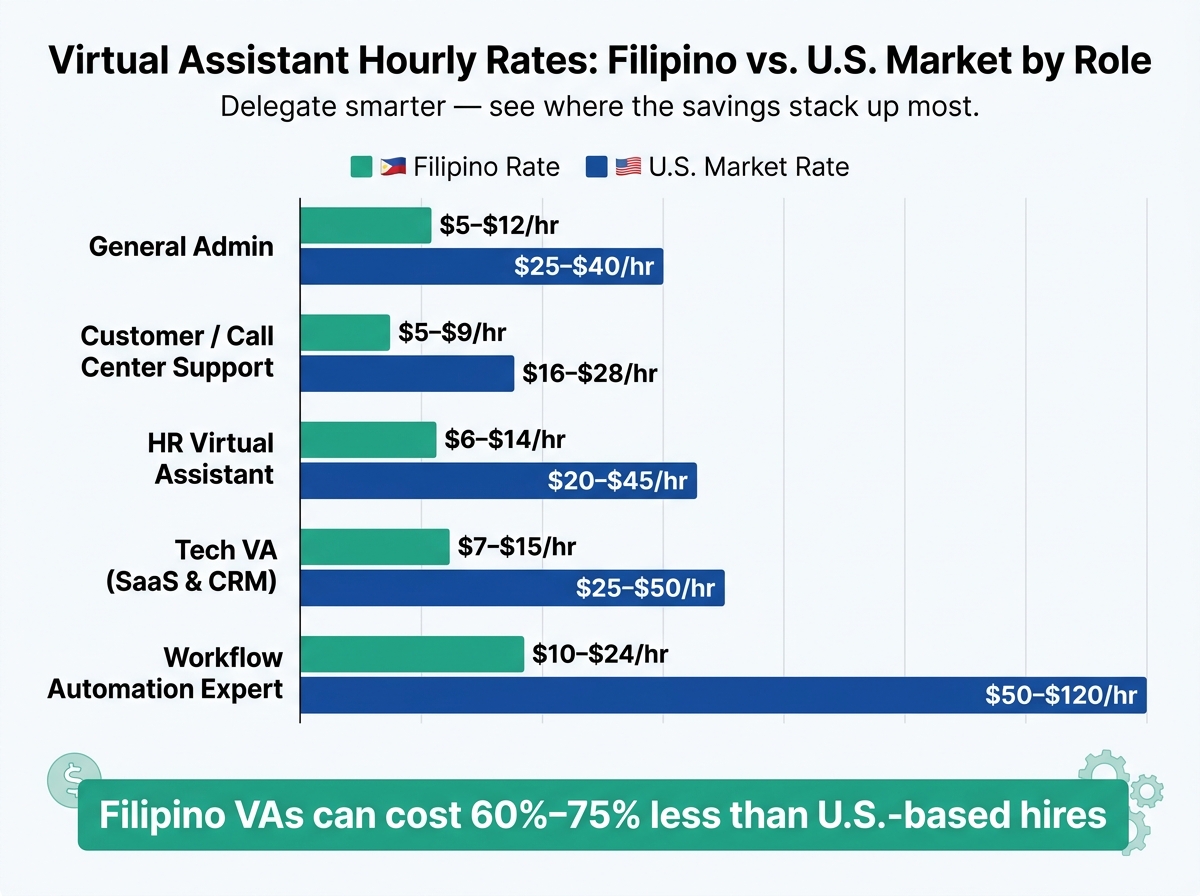
Virtual Assistant Hourly Rates: Filipino vs. U.S. Market by Role
Each task in the list below comes with an estimated hourly rate in USD. That rate shows what it may cost to hire someone in the U.S. market to handle the work. Think of it as a simple way to compare your hourly value against the cost to delegate. So these ranges aren't just pricing data. They're a practical filter.
In most cases, lower-complexity work lands in the $5–$12/hr range. More specialized tasks tend to move into the $20–$30/hr range.
For Filipino remote talent, the gap can be large. And that's where this gets useful: the difference stands out most when you compare the same task across markets. The table below maps the roles to the tasks covered later in the list.
| Role Type | Filipino Rate | U.S. Market Rate |
|---|---|---|
| General Admin | $5–$12/hr | $25–$40/hr |
| Customer / Call Center Support | $5–$9/hr | $16–$28/hr |
| HR Virtual Assistant | $6–$14/hr | $20–$45/hr |
| Talent Sourcer | $5–$12/hr | $22–$38/hr |
| Tech VA (SaaS & CRM) | $7–$15/hr | $25–$50/hr |
| Workflow Automation Expert | $10–$24/hr | $50–$120/hr |
Use these ranges to spot tasks that are worth handing off. If you're still doing low-value work yourself, this makes it easier to catch. Then use the same ranges as you go through the role-based task list and mark the work that costs you the most time and money.
1. Admin
Admin work is usually the easiest place to start delegating. These tasks tend to be repetitive, process-driven, and often land in the $5–$10/hour range. That makes this section a good starting point for work that's simple to document and simple to hand off.
The 17 tasks below go from routine work to tasks that need a bit more judgment. Entry-level VAs can take on the day-to-day items. Mid-level VAs are a better fit for research, CRM cleanup, and travel planning.
- Inbox Triage - Entry-level: Filter, flag, and reply to routine emails so your inbox stays under control.
- Calendar Management - Entry-level: Schedule meetings and appointments across time zones.
- CRM Data Entry - Entry-level: Update contact records, lead stages, and notes in tools like HubSpot or Salesforce.
- Online Research - Mid-level: Gather market intel, vendor comparisons, or competitor data.
- Document Formatting - Entry-level: Format reports, slide decks, and spreadsheets in Google Workspace or Microsoft Office.
- Travel Coordination - Mid-level: Book flights and hotels, then build detailed itineraries with backup options.
- Customer Follow-ups - Entry-level: Send confirmation messages and handle light client communication.
- File Organization - Entry-level: Keep cloud storage tidy in Google Drive, Dropbox, or SharePoint.
- CRM Hygiene - Mid-level: Clean lead databases, remove duplicates, and update custom fields.
- Meeting Minutes - Entry-level: Join virtual calls, take notes, and send action items after the meeting.
- Expense Tracking - Entry-level: Organize receipts and handle basic reconciliation before bookkeeping handoff.
- Appointment Setting - Mid-level: Make outbound calls or send messages to book sales or discovery calls.
- Form Creation - Mid-level: Build surveys or intake forms with Typeform or Google Forms.
- Transcription - Entry-level: Turn meeting recordings into clean, searchable text.
- Subscription Audits - Mid-level: Track recurring software costs and flag tools that no one is using.
- Job Posting Management - Mid-level: Post job descriptions on job boards and manage early applicant flow.
- Tool Documentation - Mid-level: Write step-by-step guides for internal tools and processes.
A simple way to begin: hand off inbox triage, calendar management, and CRM data entry first. Once that workflow is running smoothly, you can pass along the more involved tasks.
2. Customer Support
If admin work stays mostly inside the business, customer support moves the work outward to customers. That changes the stakes a bit. You're dealing with lots of messages, lots of repeat questions, and a steady stream of tasks that follow the same few patterns. That's why support is such a smart place to delegate based on hourly value.
The easiest work to hand off first is the most scripted work. If a task follows a clear process, uses saved replies, or fits inside a simple decision tree, a VA can usually take it over without much friction. As support gets less routine and needs more judgment, it makes sense to shift those tasks to a mid-level VA instead. In this group, entry-level VAs handle process-based support, while mid-level VAs are a better fit for work like complaint resolution and lead qualification.
Here are the 17 customer support tasks in this category:
- Email Triage - Entry-level: Sort and flag routine customer inquiries so nothing slips through the cracks.
- Live Chat Support - Entry-level: Answer real-time customer questions on your website.
- Order Management - Entry-level: Process transactions, track shipments, and update customers on delivery status.
- Billing Inquiries - Entry-level: Clarify charges and resolve basic payment issues.
- Basic Tech Support - Mid-level: Troubleshoot common software or account access problems using a set process.
- Service Appointment Scheduling - Mid-level: Schedule customer calls and send confirmations.
- Social Media Moderation - Entry-level: Respond to comments and direct messages across social channels.
- Post-ticket Follow-ups - Entry-level: Send post-service check-ins and satisfaction messages.
- Customer Interaction Logging - Entry-level: Log interaction history, update contact records, and tag tickets in your CRM.
- Returns & Refunds - Entry-level: Coordinate return logistics and process refund requests following your store's policy.
- Lead Qualification - Mid-level: Screen incoming inquiries to identify high-value prospects before passing them to sales.
- Helpdesk Management - Mid-level: Categorize, prioritize, and route support tickets in your helpdesk platform.
- Satisfaction Surveys - Entry-level: Conduct outbound emails or calls to collect CSAT scores after service interactions.
- Subscription Management - Entry-level: Handle renewals, cancellations, and plan upgrades.
- Onboarding Support - Mid-level: Guide new users through account setup and first-use steps for your product or platform.
- Complaint Resolution - Mid-level: Handle frustrated customers using defined de-escalation scripts, then escalate when authority limits are reached.
- Vendor Coordination - Mid-level: Communicate with couriers or third-party service providers.
One thing matters early: set up a clear escalation protocol. Your VA should know exactly when to pass an issue up, who it goes to, and what details need to go with it. Every handoff should include the full ticket history so the next person isn't starting blind.
If you're deciding where to begin, start with live chat support, email triage, and order management. Those tasks tend to be high-volume, easy to document, and simple to train.
3. Marketing
Marketing is usually the next function people hand off after admin and support. And that makes sense.
A lot of marketing work is repeatable. It tends to come in batches. And once the process is clear, a VA can often run with it without much day-to-day input.
This kind of handoff works best for high-volume tasks like social scheduling, lead list building, and email formatting. In this category, general marketing tasks usually sit in the $5–$12/hr range, while higher-skill work like automation and landing pages tends to land in the $7–$15/hr range.
Use those pay ranges to group tasks by cost, difficulty, and how fast a VA can take them over.
Here are the 17 marketing tasks in this category:
- Social Media Scheduling - $5–$10/hr: Schedule posts across platforms using Meta Business Suite or Buffer.
- Basic Graphic Design - $5–$10/hr: Create social graphics, banners, and branded visuals in Canva.
- Lead List Building - $5–$10/hr: Source and verify contact data from LinkedIn or Apollo.io for outreach campaigns.
- Email Newsletter Formatting - $7–$12/hr: Format weekly broadcasts in Mailchimp or ConvertKit for approval and send.
- Campaign CRM Cleanup - $8–$15/hr: Update lead statuses, merge duplicates, and maintain campaign tags, lifecycle stages, and source fields.
- WordPress Page Updates - $7–$15/hr: Swap out images, update copy, and manage plugins on existing WordPress or Webflow pages.
- Landing Page Configuration - $7–$15/hr: Build simple lead capture pages in Unbounce or Tally and test the forms.
- Competitor Research - $5–$12/hr: Monitor competitor social activity, pricing changes, and new offers, then send a weekly summary report.
- Short-Form Video Editing - $5–$10/hr: Trim and format social clips using CapCut for Reels, Shorts, or TikTok.
- Email Automation Setup - $8–$15/hr: Build welcome sequences or abandoned cart flows inside Klaviyo or Mailchimp.
- Product Listing Management - $6–$10/hr: Upload new products, write descriptions, and update inventory on Shopify or eBay stores.
- Webinar & Event Support - $5–$12/hr: Manage registrations, send reminder emails, and follow up with attendees after the event.
- Form & Popup Setup - $7–$15/hr: Configure lead-capture popups and embed forms across your site or landing pages using Typeform or Unbounce.
- Warm Lead Follow-Up - $5–$12/hr: Follow up with webinar registrants, content download leads, and demo-request inquiries via email or phone.
- Marketing Report Preparation - $8–$15/hr: Pull data from your ad platforms, email tools, and CRM into a weekly performance tracker.
- Marketing Process Guides - $5–$12/hr: Write step-by-step SOPs for content, email, and campaign workflows.
- Community Comment Moderation - $5–$12/hr: Respond to routine inquiries on social media comments and campaign DMs.
A smart place to begin is with social media scheduling, lead list building, and email newsletter formatting.
Why these first? They’re simple to document, easy to check, and usually don’t need much back-and-forth once your VA knows your tools and workflow. After those are running well, you can start handing off the higher-rate work.
4. Sales
Sales has a lot of repeatable work. And a lot of it does not need a closer.
If a task doesn't involve closing, pricing, or judgment, hand it off. That's usually the work that keeps the pipeline moving before a rep steps in to finish the deal.
General sales admin work usually runs $5–General sales admin work usually runs $5–$12/hr2/hr. More technical work, like CRM automation and workflow builds, tends to land in the $7–$15/hr range. Cold calling often falls between $5–$9/hr, while appointment setting usually sits in the $7–$12/hr range.
That gives you a simple way to split the work: support on one side, true closing on the other.
Here are the 17 sales tasks:
- Lead List Building - $5–$10/hr: Build sales-qualified prospect lists from target accounts, referrals, and inbound leads.
- CRM Data Entry - $5–$7/hr: Update opportunity stages, next steps, and close dates in the CRM.
- Appointment Setting - $7–$12/hr: Coordinate calendars between prospects and sales reps to book qualified discovery calls.
- Cold Calling - $5–$9/hr: Call prospects to gauge interest and route qualified leads to a sales rep.
- Pipeline Cleanup - $5–$10/hr: Find and remove stale or unresponsive leads from the CRM so the pipeline stays accurate.
- Proposal Follow-Up - $7–$12/hr: Send scheduled reminders to prospects who haven't signed contracts.
- Lead Qualification - $7–$12/hr: Screen inbound prospects against ICP and buying intent before routing them.
- Sales Reporting - $8–$12/hr: Pull weekly or monthly CRM metrics into a clean spreadsheet.
- Presentation Design - $7–$12/hr: Format and update slide decks for sales pitches using your existing templates.
- CRM Automation - $8–$15/hr: Build Zapier or Make triggers to sync leads between your CRM, email platform, and calendar tools.
- Email Sequence Management - $7–$12/hr: Set up and monitor automated drip campaigns inside your email platform or CRM.
- Competitor Monitoring - $5–$10/hr: Track rival pricing and feature updates to support objection handling and deal strategy.
- Meeting Minutes - $5–$10/hr: Capture sales call notes, objections, and next steps.
- LinkedIn Engagement - $5–$10/hr: Comment on and like prospect posts to build rapport before outreach.
- Sales Inquiry Routing - $5–$10/hr: Monitor a general
sales@inbox and route inquiries to the right rep by lead source, urgency, and fit. - Contract Preparation - $7–$12/hr: Draft standard agreements using pre-approved templates for review and signature.
- Customer Surveys - $5–$10/hr: Collect post-sale feedback.
If you're deciding where to start, begin with lead list building, CRM data entry, and appointment setting.
Those tasks are easier to hand off, easier to check, and they free up reps for calls that can turn into revenue. After that, invoices, receipts, and reconciliations often become the next clean handoff point.
5. Bookkeeping
After sales, bookkeeping is one of the cleanest handoffs. The work repeats, runs on deadlines, and is easy to check.
Transactions come in every week. Invoices need to go out. Reconciliations happen every month. So the same rule applies here: hand off repeat tasks when they cost less to assign than to keep in-house. Routine work usually falls in the $5–$7/hour range, reconciliation and accounting-system work in the $7–$11/hour range, and automation in the $8–$15/hour range.
Because financial data is sensitive, have the VA sign an NDA and give access only to the accounts and records they need.
Here are the 17 bookkeeping tasks you can delegate:
- Expense Categorization - $5–$7/hr: Sort and tag transactions from bank feeds or credit card statements into the right expense categories.
- Data Entry into Accounting Software - $5–$7/hr: Enter receipts, bills, and transaction details into QuickBooks Online, Xero, or Google Sheets.
- Receipt Collection & Organization - $5–$7/hr: Gather receipts and match them to the right transactions.
- Invoice Generation & Delivery - $6–$10/hr: Create and send client invoices from approved templates in QuickBooks Online or Xero.
- Invoice Follow-Up - $6–$10/hr: Send scheduled payment reminders to clients with unpaid balances.
- Accounts Receivable Updates - $6–$10/hr: Record incoming payments and update open invoice statuses in your accounting software.
- Accounts Payable Updates - $6–$10/hr: Track vendor bills, due dates, and payment status so payables stay current.
- Collections Follow-Up - $6–$10/hr: Contact overdue clients by email or phone to recover unpaid balances.
- Billing Inquiry Management - $6–$10/hr: Handle billing disputes, payment-status questions, and ledger corrections before escalation.
- Refund & Return Processing - $6–$10/hr: Post approved refunds, update the ledger, and reconcile the transaction in the billing or e-commerce system.
- Timekeeping & Leave Tracking - $6–$10/hr: Keep employee time logs and leave balances up to date in tools like BambooHR or Rippling.
- Bank Reconciliation - $7–$11/hr: Match transactions in QuickBooks Online or Xero against bank and credit card statements each month.
- Bookkeeping SOP Documentation - $7–$11/hr: Write month-end close steps, reconciliation checklists, and invoice-processing SOPs.
- Payroll Preparation - $7–$12/hr: Compile hours worked and prepare payroll data for review before processing.
- Budget Variance Reporting - $8–$12/hr: Pull actuals against budget each month and format the comparison into a clean report.
- 1099 & Tax Document Preparation - $8–$12/hr: Gather contractor payment records and organize documents ahead of tax filing.
- Payment and Invoice Automation - $8–$15/hr: Build Zapier or Make automations to sync Stripe payments, invoices, and CRM records automatically.
A simple place to begin is with expense categorization, data entry, and invoice follow-up. They’re routine, easy to review, and they free up time fast. After that, you can move into executive-assistance work that also runs on repeat steps and clear approvals.
6. Executive Assistance
After bookkeeping, the next clean handoff is executive assistance. This area covers owner-facing work that doesn't need the owner's direct attention, even though it sits close to their schedule, inbox, and day-to-day coordination.
Routine EA tasks usually cost $5–$7/hr, mid-level support runs $7–$11/hr, and higher-touch coordination can reach $11–$18+/hr.
If the work includes personal or financial details, use an NDA and give access only to the tools and accounts the assistant needs.
These tasks sit closest to the owner's time, communication, and decisions. Here are the 16 executive assistance tasks you can delegate:
- Owner Inbox Triage - $5–$7/hr: Sort, flag, and reply to routine emails so the owner only sees what needs direct attention.
- Owner Calendar Management - $5–$7/hr: Schedule, move, and confirm meetings across time zones.
- Travel Planning - $5–$7/hr: Book flights, hotels, and ground transportation, then build a full itinerary with backup options for delays.
- Owner File Management - $5–$7/hr: Keep digital folders organized so the owner's documents are easy to find.
- Meeting Reminders - $5–$7/hr: Send prep notes and agenda reminders before calls or meetings.
- Executive Meeting Notes - $7–$11/hr: Take notes during the owner's calls, turn them into action items, and send them out afterward.
- Expense Reconciliation - $7–$11/hr: Match receipts to credit card statements and prepare a clean expense report for review.
- Vendor Coordination - $7–$11/hr: Communicate with service providers, follow up on quotes, and track deliverables.
- Research Summaries - $7–$11/hr: Pull together background research on prospects, partners, or market topics into a concise summary.
- Project Tracking - $7–$11/hr: Update task statuses and flag anything falling behind schedule.
- Owner-Facing CRM Updates - $7–$11/hr: Log meeting notes, update contact records, and keep deal stages current.
- Personal Scheduling - $7–$11/hr: Coordinate medical appointments, family events, and personal commitments so they don't clash with work.
- Gift and Reservation Booking - $7–$11/hr: Research and book restaurants, source gifts, and handle related personal logistics when asked.
- Executive Document Prep - $7–$11/hr: Draft and format reports, slide decks, offer letters, or contracts using approved templates.
- Stakeholder Coordination - $11–$18+/hr: Manage scheduling and communication with board members, key partners, or major clients on the owner's behalf.
- Board Meeting Preparation - $11–$18+/hr: Compile materials, format agendas, and coordinate logistics for board or leadership meetings.
A good place to start is owner inbox triage, calendar management, and travel planning. They come up often, they're easy to document, and they can give hours back each week fast.
Use this section for tasks that repeat, need judgment only at the edges, and free up the owner first.
How to Decide Which Tasks to Delegate First
Use the task list above to rank work by hours saved, not just by job title. The best place to start is usually the work that eats up the most time but doesn't call for much judgment.
That's why admin tasks often come first. They're routine, repeatable, and often give you back 10–20 hours per week within the first month.
Once that part is running well, move into customer support. After that, hand off marketing execution and sales support. Think of it like building in layers: admin first, then support, then growth, then more specialized work.
Here’s a simple sequence for your first handoff:
| Phase | Role Area | Start With |
|---|---|---|
| 1 - First | Admin | Inbox triage, calendar scheduling, data entry |
| 2 - Next | Customer Support | Email/chat responses, order processing, ticket management |
| 3 - Growth | Marketing & Sales | Social scheduling, lead lists, CRM updates |
| 4 - Specialized | Bookkeeping Support | Invoice follow-up, invoice processing |
| 5 - Advanced | Executive Assistance | Team coordination, stakeholder coordination, complex workflows |
It's also smart to start part-time before moving to full-time. A paid 2–4 hour test on a real business task can tell you a lot about someone's attention to detail and how well they communicate before you make a bigger commitment.
For that first handoff, stick with process-based work. Clear instructions. Simple review. Less guesswork.
Conclusion
After looking through the list, the pattern is pretty clear: a VA makes sense when the work fits the role and costs less than your time is worth. That’s when the math starts working in your favor, and the savings can stack up fast.
But the upside isn’t only about cost. It’s also about getting your focus back. Those reclaimed hours can go toward revenue, planning, and the decisions that only you should make.
A smart place to begin is with admin, support, and invoiced or repetitive work. That’s usually where the lowest-value tasks live, and it’s often where delegation pays off first.
Next, pick 5–10 time-consuming tasks that don’t need your direct expertise, then start there. Use FindTalent.ph to browse verified, role-specific candidates and message them directly.
FAQs
How do I choose the first tasks to delegate?
Start with tasks that are repetitive, process-based, and easy to measure. That makes them much easier to document once and hand off without turning the whole thing into a guessing game.
Good first picks include inbox and calendar coordination, data entry and CRM updates, scheduling, and routine customer follow-ups. Pair each task with the right type of VA and the tools they’ll use, then run a short paid trial and set clear SOPs or acceptance criteria so you can check quality fast.
What tasks should a VA not handle?
A VA should not take on work that calls for high-level judgment, policy calls, or decisions tied to regulated or sensitive matters.
Take an HR VA as an example. They should not handle employee relations issues like performance disputes, harassment complaints, or terminations. Those situations can get messy fast, and they often need a manager, HR lead, or legal review.
If a task falls outside the set workflow, the VA should escalate it instead of acting without approval.
How do I train a VA for repeatable work?
Document the process once, hand it off, and let your VA run with it. Clear standard operating procedures set expectations and keep the work steady from one task to the next.
For technical or more complex work, ask your VA to build tool-stack documentation so the team can troubleshoot on its own. It also helps to start with a trial period tied to clear, specific deliverables. That gives you a clean way to judge performance before you commit to a long-term engagement.